Google Play foldable app requirements for 2027 make adaptive behavior a release-scoping question. Before commissioning a redesign, ask a vendor to demonstrate what happens to your customer’s unfinished work when a device folds or rotates. A screenshot cannot show whether a checkout draft survived.
This report gives buyers a five-screen worksheet, two fictional charts and a two-track planning infographic. The example separates clipped controls from lost state. It also separates required fixes from optional redesign. No real app was tested, and the worksheet does not certify Google Play approval.
Google Play foldable app requirements 2027: keep the milestones separate
Google’s 18 November announcement sets April 2027 for standard apps’ Tier 3 foldable baseline and three foldable screenshots alongside two phone screenshots. Existing apps not updated remain downloadable. New apps and updates face a separate API 37 targeting milestone in August 2027. Games have their own guidance. Check the original notice when planning a submission.
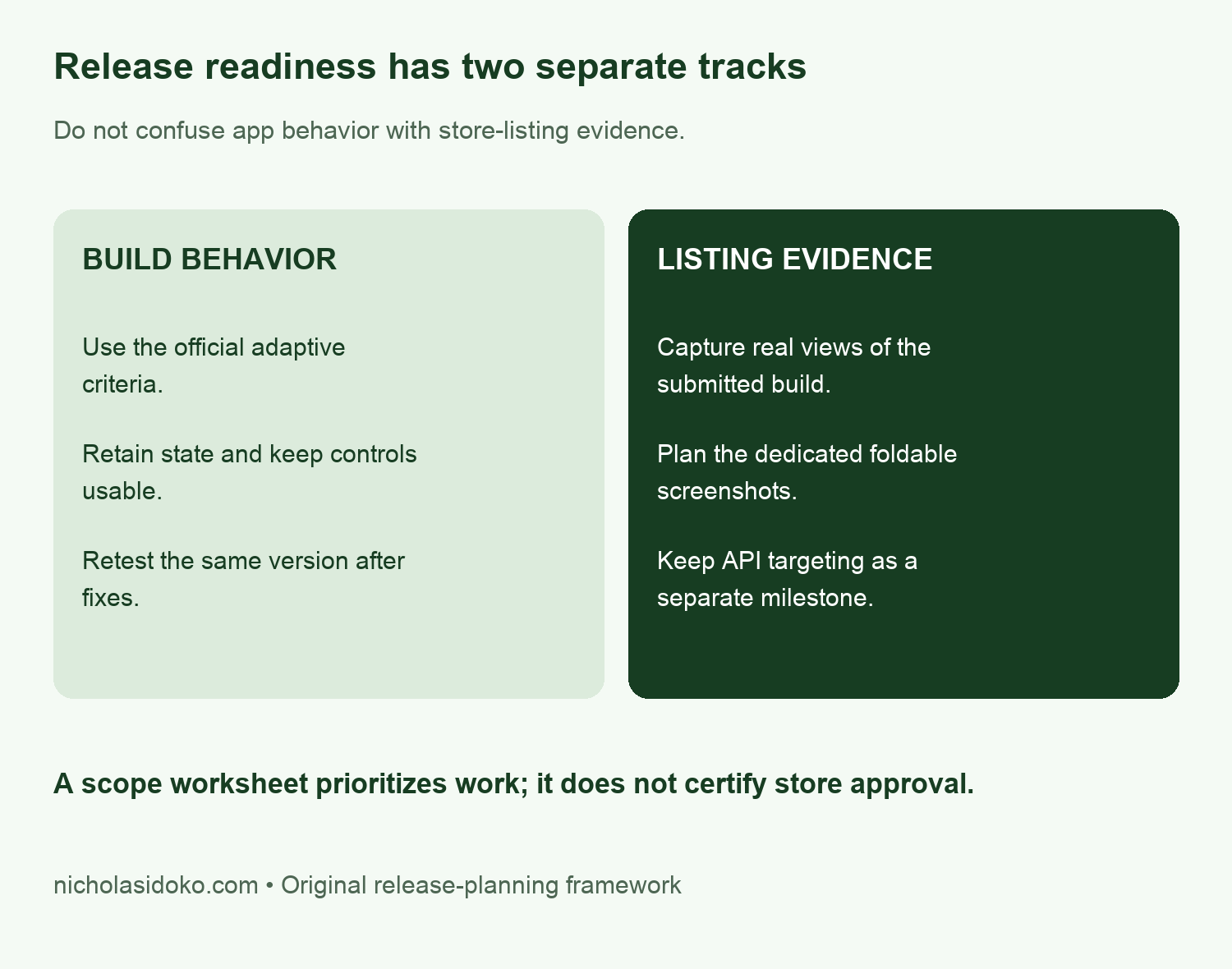
For a buyer, these are separate work packages. One concerns behavior in the build. Another concerns evidence for the listing. A third concerns the platform target. Therefore, ask for distinct estimates, owners and acceptance evidence rather than a single promise that the app will be ready.
Choose five screens where lost work would matter
Start with a draft form, sign-in, search, a detail view and checkout. These are our suggested buyer priorities, not a universal list. Replace them when your app has a different important journey. For example, a booking confirmation may matter more than a product detail screen.
Next, create a row for each screen in folded, unfolded and rotated layouts. Five screens multiplied by three layouts produces 15 initial checks. That count describes the worksheet’s scope. It does not mean that 15 checks cover every device, accessibility need, window configuration or official requirement.
Write down the expected state before each transition. A draft might contain a test address and delivery choice. Search might retain the query, filters and position. Use synthetic information rather than real customer details. Then repeat the transition on a named build and device or emulator, recording the actual result.
Read the fictional failure map without inventing an audit result
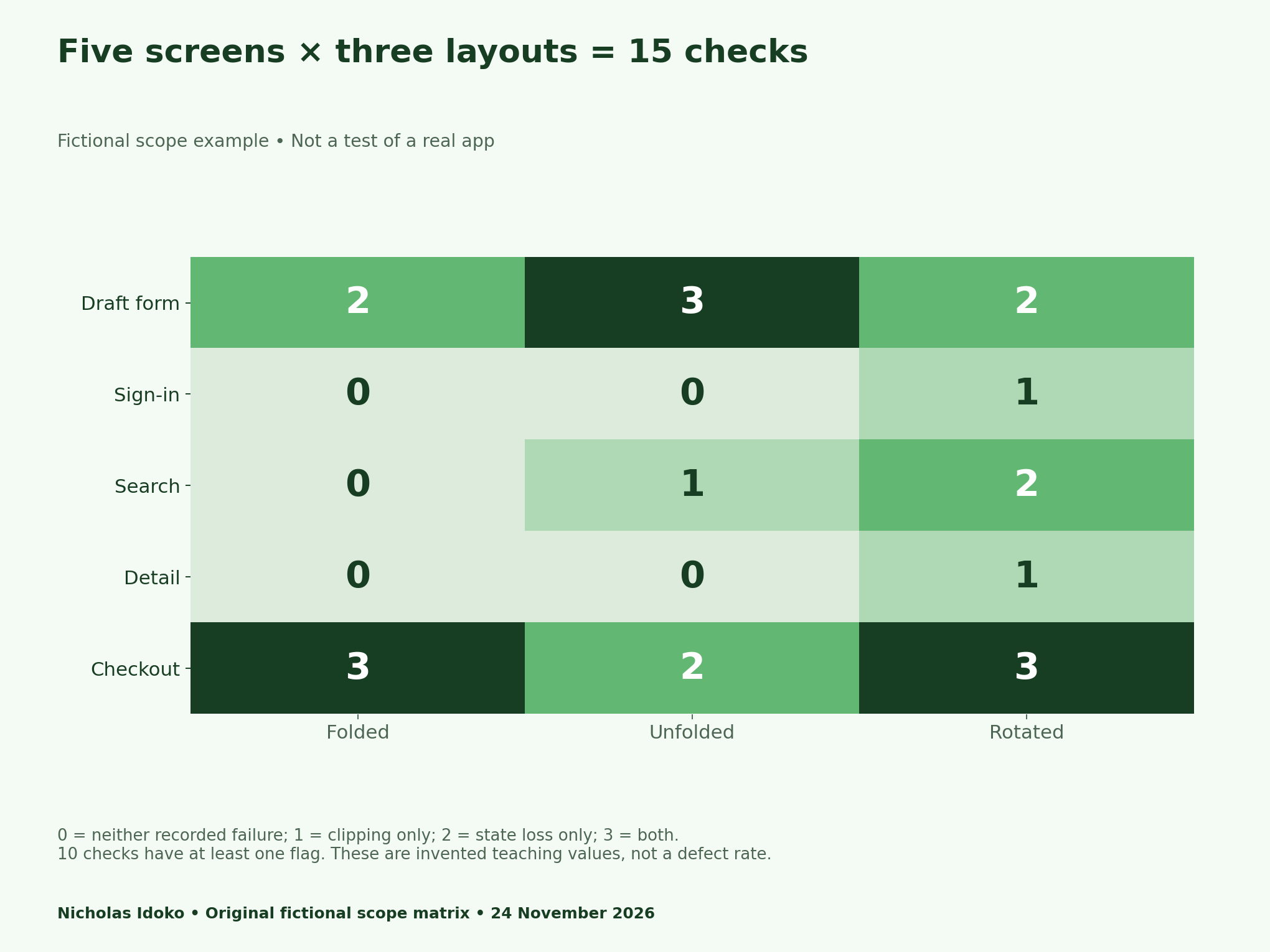
The demonstration contains six clipping flags and seven state-loss flags. Three checks have both. As a result, there are ten checks with any recorded failure: 6 + 7 − 3. Adding the two flag totals without subtracting overlap would incorrectly count thirteen failed checks.
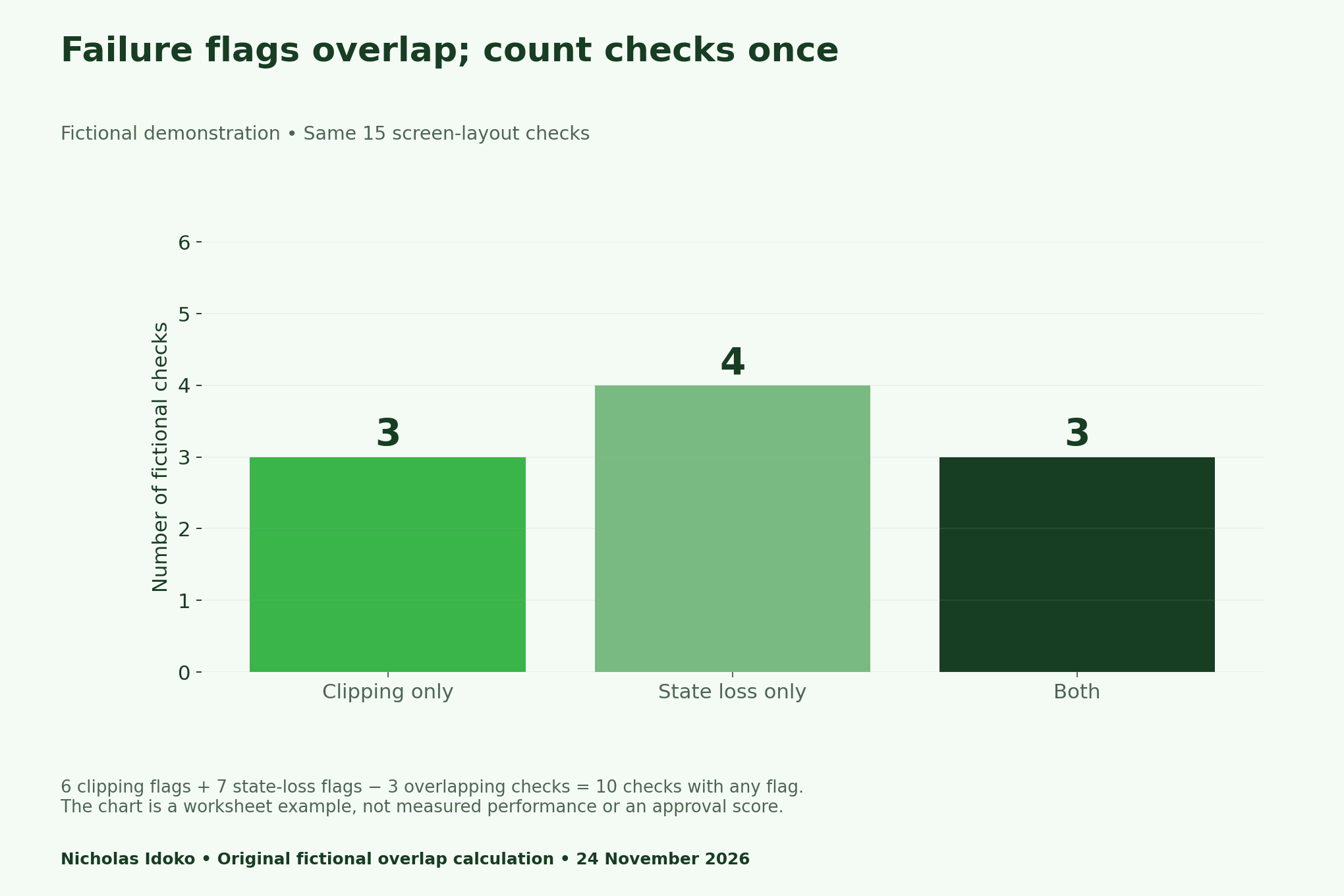
Treat the two failure types differently during triage. A hidden submit button may prevent completion even when data survives. Lost form state may destroy work even when every control remains visible. Each requires its own reproduction steps and retest evidence. A visual refresh alone does not prove either problem was resolved.
Tie required fixes to official criteria
The official adaptive quality guidelines provide the criteria and test references. Tier 3 concerns baseline adaptive readiness, including usable layouts and continuity through relevant configuration changes. Higher tiers introduce additional optimization and differentiation. Use the current checklist directly rather than treating this article as the specification.
In the worksheet, link each proposed required fix to the relevant criterion and observed evidence. Keep an optional multi-pane redesign in a separate column when its scope is different. This makes commercial decisions clearer: the buyer can see which work addresses a demonstrated problem and which adds a new experience.
Ask for evidence from the submitted build
Google’s screenshot capture guidance explains emulator profiles and accepted screenshot sections. Ask the vendor to identify the build and device configuration used for each capture. Preserve the original images alongside the relevant worksheet row. A marketing mockup should not stand in for evidence of actual behavior.
For each fix, agree on a repeatable acceptance demonstration. For instance, enter a synthetic draft, unfold the device, rotate it and return to the original view. Then check the expected state and control visibility. Record the result rather than assuming that a successful launch means the journey works.
Also record what remains outside the demonstration. A test on one emulator cannot establish behavior across every physical device, Android version or third-party integration. State those limits before sign-off. The next useful decision is which additional evidence the release risk warrants, not whether to declare universal compatibility.
Use the worksheet in a development brief
Our software development services can help turn a customer journey into an implementation scope. Bring a release date, the three screens customers rely on most and a description of unfinished work worth preserving. Avoid sending production credentials or sensitive customer data.
Share your planned release date and three screens customers rely on. We’ll scope the adaptive work before it becomes a release blocker. The first conversation should clarify the evidence and boundaries of the work, rather than promise approval or an untested deadline.
Methods, limitations and downloadable tools
We checked the linked Google sources on 24 November 2026. All 15 screen-layout observations are invented. We calculated separate failure counts and their overlap directly from that fixture. No customer device, repository, Play Console submission or vendor was audited. This is a release-planning tool, not a compliance certificate.
- Fifteen fictional screen-layout observations (CSV)
- Scope and overlap calculations (CSV)
- Blank five-screen scope worksheet (CSV)
- Milestones and release evidence register (CSV)
Suggested citation: Nicholas Idoko, “Google Play Foldable Requirements: Scope Your 2027 App Update”, 24 November 2026. Cite Google for the announced requirements and this article for the original worksheet and fictional overlap example. Find more practical tools in Research & Reports.
Support our research
Found this report useful? Your contribution helps us produce carefully sourced research, clear charts and practical resources, freely available to everyone. Choose a one-time amount that works for you.


